AI Agents for Business: Deploying Them Without Unchecked Access
By Shiva Mangal, Grail Computer Labs
AI agents for business are software agents that carry out multi-step tasks inside company systems, and deploying them safely means defining what each agent may touch before it does any work, not after. Most stalled rollouts share one cause: the agent can do the job, but nobody has agreed what it may read, change or approve, and putting that decision off becomes the security review that stops the project. Gartner's 2025 forecast, as reported by Digital Applied, says over 40% of agentic AI projects will be cancelled by the end of 2027 (Digital Applied, 2026). This article sets out a five-step deployment sequence and applies it to vendor onboarding.
Key Takeaways
AI agents for business should start read-only and gain write actions one at a time through a per-workflow allowlist.
Secrets and personal data should be masked before they reach an agent, and each agent should hold its own credentials.
An AI agent audit log must record the agent, the delegating human, the tool, masked inputs and outputs, the approver and a timestamp.
Human approval gates belong on financial and vendor actions, such as bank-detail changes and first payments.
Vendor onboarding suits an AI agent because the work is structured data collection and verification, with a human decision at the end.
How do enterprises roll out AI agents across multiple business functions without losing control or oversight?
Enterprises roll out AI agents across multiple business functions without losing control by fixing each agent's permissions before it does any work, then widening them in five ordered steps: read-only access, per-workflow action allowlists, masked secrets, an audit trail from day one, and human approval gates on financial and vendor actions. Grail Computer Labs follows this sequence for every workflow it automates.
Five numbered index cards laid in a row on a pale desk, each beside a small brass key
The sequence matters because most organisations have no permission model to begin with. Only 12% of organisations describe their AI permissions as tightly scoped and easy to review, and only 14% review them continuously or automatically (JumpCloud via VentureBeat, 2026). Least privilege is the practice of giving an identity only the access its task requires. Starting without limits is the common path. Retrofitting limits across several functions is the expensive one.
Step
Control
What it prevents
1
Read-only access
An agent changing data before anyone has seen how it behaves
2
Per-workflow action allowlist
An agent taking actions the workflow never needed
3
Secrets and personal data masked
Credentials and sensitive values reaching the agent
4
Audit trail from day one
Actions nobody can explain to an auditor
5
Human approval gates
Irreversible financial or vendor actions running unchecked
Each step is a precondition for the next. An allowlist without read-only observation is a guess. An approval gate without an audit trail leaves no evidence of who approved what. We apply the order per workflow, not per company, so a second function starts at step 1 even when the first is at step 5.
How do I deploy AI agents across business workflows without giving them unchecked access to production systems?
Deploying AI agents across business workflows without unchecked access to production systems means starting each agent with read-only access and adding write actions one at a time through an explicit allowlist for each workflow. The only reliable way to prevent an AI agent from doing something is to make it physically impossible, so the limit sits in the runner, not in the prompt.
A closed brass padlock beside a printed checklist with one item ticked and a steel ruler on a grey desk
Read-only access is access that lets an agent view records and documents but not change or delete them. Each new agent runs this way first. Reviewers check what it reads and what it would have done, then promote single actions.
An allowlist is an explicit list of the actions an agent may take in one workflow, with everything else denied. The runner is the component that executes agent actions and refuses any that are not on the list. Allowlists are written per workflow, not per agent type. Prompt rules are instructions, not boundaries, because the agent can reason around them. The Cloud Security Alliance puts the principle directly: "Agents should not hold standing access to production systems" (Cloud Security Alliance, 2026).
Why identity comes before permissions
JumpCloud writes: "Least privilege starts with knowing which identity is acting, what it’s there to do, and who is accountable for it." (JumpCloud via VentureBeat, 2026). Shared credentials break that chain. 69% of enterprises share AI agent credentials (VentureBeat Research, 2026), and 63% of organisations using agents rely on shared service accounts or long-lived API keys (JumpCloud via VentureBeat, 2026). Every agent needs its own identity and a named human sponsor. Only 28% of organisations can trace agent actions to an accountable human across all environments (Cloud Security Alliance, 2026).
Confidence is not enforcement
A 2026 survey of 202 enterprise IT and security leaders, run by Cequence Security and Enterprise Management Associates, found that 94% were confident their agents had no excess access, yet only 33% provision agents with least-privilege access (SecurityBrief, 2026). Confidence is a reason to test, not a control.
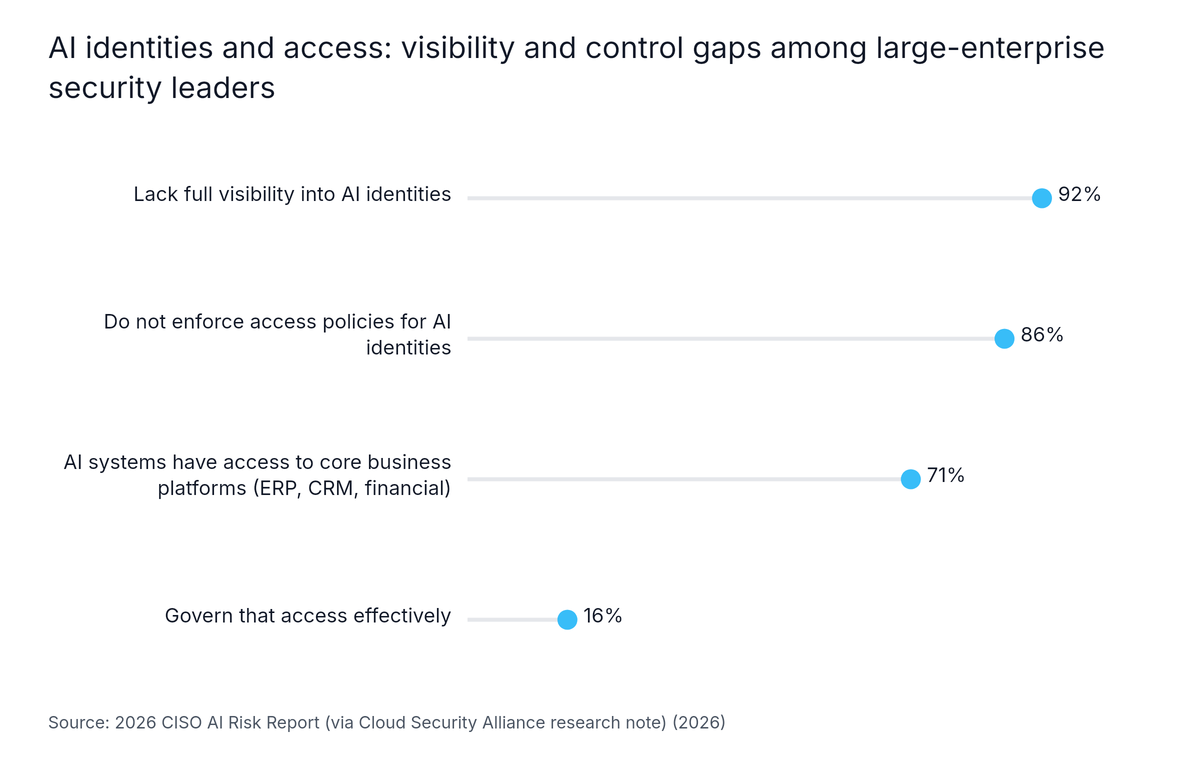
The gap shows up in core systems too. A 2026 CISO AI Risk Report of 235 large-enterprise security leaders, as summarised by the Cloud Security Alliance (the note does not name the report's publisher), found that 92% lack full visibility into their AI identities and 86% do not enforce access policies for them. It also found that 71% report AI access to ERP, CRM and financial systems, while only 16% govern that access effectively (Cloud Security Alliance, 2026).
Lollipop chart: AI identities and access: visibility and control gaps among large-enterprise security leaders. Highest: Lack full visibility into AI identities at 92%.
How do I automate internal workflows with AI without exposing sensitive data outside our environment?
Automating internal workflows with AI without exposing sensitive data outside the environment means masking secrets and personal data before any text reaches the agent, and running the agent on infrastructure the organisation controls. Secrets masking is the removal or replacement of credentials and sensitive values in an agent's input. Zero data retention with any model provider adds a further layer where policy requires it.
Paper strips with black redaction bars next to a sealed envelope on a pale desk
The exposure is already common. 71% of respondents report that AI agents have access to sensitive data such as customer information, IP and HR data (1Password, 2026). Only 44% of organisations say they know where all the credentials used by AI agents are stored (Akeyless, 2026).
Four controls keep data inside the environment:
Deploy on your own infrastructure. Run the agent on client infrastructure or a private cloud, under the organisation's AI and security policies.
Mask before the agent sees it. GC Labs masks likely secrets before they reach an agent. Masking is pattern-based, so treat it as a filter that lowers risk, not proof that nothing leaks.
Retain nothing at the provider. Use zero data retention where required, and confirm that content is never used to train models or shown to other customers.
Scope credentials per agent. One agent, one set of credentials, rotated and revocable.
The same logic applies to health and financial records. Mask the identifier fields the task does not need, and let the agent work on the remainder.
If your team is deciding where to start, Book a call ↗ and we will map one workflow against these four controls.
What should an audit log capture when an AI agent takes an action in a regulated workflow?
An audit log is a time-ordered, tamper-resistant record of who or what did what, with which inputs, and who approved it. For an AI agent in a regulated workflow it should capture the agent's identity, the delegating human, the tool called, masked inputs and outputs, the policy decision, the approver and a timestamp. Only 37% of IT leaders say they are fully prepared for an AI audit (JumpCloud via VentureBeat, 2026).
An open paper ledger with ruled columns, a fountain pen and a date stamp on a light surface
Sources tell teams to keep an audit trail but rarely say which fields it needs. This is the minimum we record:
Field
What it holds
Why an auditor asks for it
Agent identity
The unique ID of the acting agent
Separates one agent's actions from another's
Delegating human
The named sponsor who assigned the task
Establishes accountability
Tool called
The system and action invoked
Shows what the agent touched
Inputs and outputs
Values after masking
Shows what the agent saw and produced
Policy decision
Allowed, denied or sent for approval
Shows the allowlist working
Approver
The person who approved, with the evidence shown
Proves a human decided
Timestamp
When each event occurred
Orders the sequence
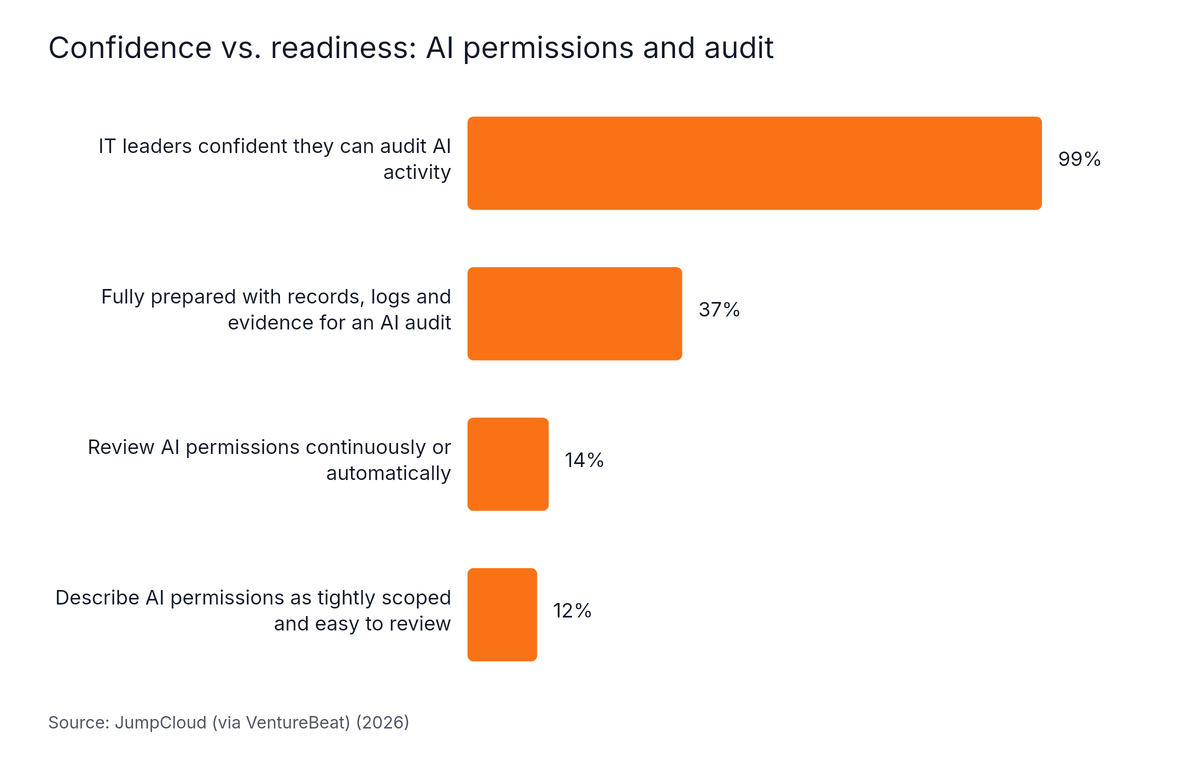
Teams overestimate their readiness. In the same JumpCloud survey, 99% of IT leaders are confident they can audit AI activity, but only 37% are fully prepared with the records, logs and evidence an audit would require. JumpCloud sells identity products and the page does not state a sample size, so read the figures as indicative.
Horizontal Bar chart: Confidence vs. readiness: AI permissions and audit. Highest: IT leaders confident they can audit AI activity at 99%.
Monitoring is thin too. Only 38% of organisations monitor AI traffic end-to-end across prompts, tool calls and outputs, according to an EY and AIUC-1 Consortium survey as cited by the Cloud Security Alliance (Cloud Security Alliance, 2026). We have not opened the original EY survey. The log must be on before the first action runs, because evidence cannot be added afterwards.
Our data: In a Singapore-based neobank's know-your-transaction (KYT) workflow, a one-week build raised automated approvals from approximately 44% to approximately 90% in testing, with a human-reviewed step kept in the flow. Eight transaction checks went live for the same neobank in under 30 days.
Our vendor onboarding takes weeks of back-and-forth: how can an AI agent handle the data collection and checks?
An AI agent for vendor onboarding collects the vendor's documents through one structured request, checks each field against registries, sanctions lists and insurance records, and sends specific gaps back to the vendor in a single message. It then stops for human approval before any bank-detail change or first payment is made.
A stack of blank vendor forms with a rubber approval stamp and paperclips on a pale desk
Vendor onboarding drags on because information arrives piecemeal. Someone asks for a document, the vendor sends the wrong version, and the cycle repeats. We found no independent, dated benchmark for onboarding cycle times with AI, so we state none here. The structure below is what removes the repeat requests. Our page on the vendor onboarding agent shows the workflow in more product detail.
Stage
Agent does
Access level
Human step
Intake
Sends one request listing every required document
Read and message
None
Collection
Reads incoming files, extracts fields
Read-only
None
Verification
Runs registry, sanctions and insurance checks
Read-only on external sources
Reviews flagged mismatches
Record staging
Prepares the vendor record
Allowlisted write to a draft
None
Activation
Prepares payment setup
No write access
Approves bank details and first payment
Where human approval gates belong
A human approval gate is a point where an agent stops until a named person approves an action. Singapore's Model AI Governance Framework for Agentic AI calls for "Making humans meaningfully accountable for agents by defining significant checkpoints at which human approval is required" (Infocomm Media Development Authority via MDDI, 2026). In vendor onboarding, those checkpoints are bank-detail changes and the first payment.
Gates only work if people read them. Each approval should go to the person who knows the account, with the evidence attached, and gates should be tiered by risk so reviewers do not rubber-stamp everything. Only 34% of organisations apply the same security controls to agents as to human staff (Okta, 2026). A gate on money is the check that still holds when other controls slip.
Who this approach is not for
Governed AI agents for business are agents whose permissions, approvals and logs are fixed before launch, and they suit enterprises that can name one owner per workflow. They are slower to start than an open-access pilot. Only 44% of organisations have policies in place to secure AI agents (SailPoint and Dimensional Research via Varonis, 2025), so many teams must write those policies first.
That figure comes from a vendor blog relaying a 353-person survey, so treat it as lower confidence. Four further limits apply:
Masking is not perfect. Pattern-based masking catches likely secrets, not every sensitive value, so keep the agent's data scope narrow as well.
Approval gates add latency. A gate on every action turns the agent into a queue. Gate only the actions that are hard to reverse.
The controls need an owner. Allowlists and logs drift without a named person reviewing them on a schedule.
No certification. Grail Computer Labs holds no SOC 2, ISO 27001 or HIPAA certification, and will complete a vendor security and compliance assessment as part of onboarding.
Teams worried about a repeat of a failed vendor can start with the 15-day trial, which carries no payment commitment, and the client owns the code, cloud, models and documentation throughout. Teams that want an agent live in a day, or have nobody accountable for the process, should fix that first.
Frequently Asked Questions
What should an audit log capture when an AI agent takes an action in a regulated workflow?
An audit log for an AI agent action in a regulated workflow should capture the agent's identity, the human who delegated the task, the tool called, the inputs and outputs after masking, the policy decision, the approver and a timestamp. Write each entry when the action happens, store it where the agent cannot edit it, and keep it for the period the regulator requires.
How do I deploy AI agents across business workflows without giving them unchecked access to production systems?
Deploy AI agents without unchecked production access by starting each agent read-only, granting write actions one at a time through a per-workflow allowlist, giving every agent its own credentials, and enforcing the limits in the runner rather than the prompt. Add an approval gate on financial and vendor actions, and keep an audit trail running from the first day.
Our vendor onboarding takes weeks of back-and-forth. How can an AI agent handle the data collection and checks?
An AI agent handles vendor onboarding by sending one structured request listing every required document, validating each field as it arrives, and returning specific gaps to the vendor in a single message. It runs registry, sanctions and insurance checks, then hands a verified packet to a person for approval of bank details and the first payment.
How do I automate internal workflows with AI without exposing sensitive data outside our environment?
Automate internal workflows without exposing sensitive data by running the agent on infrastructure the organisation controls, masking likely secrets and personal data before text reaches the agent, using zero data retention with any model provider, and scoping credentials per agent. Confirm in writing that company content is never used to train models or shown to other customers.
Which AI agent actions should always require human approval?
AI agent actions that move money, change bank details, create or activate a vendor, delete records or send external commitments should always require human approval. The test is whether the action is hard to reverse or carries financial or legal weight. Route each approval to the person who knows the account, and show that person the evidence.
Conclusion
Enterprises roll out AI agents across business functions by deciding what each agent may touch before it runs. That is the standard enterprise teams should demand before putting AI agents into real workflows. The agents execute. People decide.
Start every agent read-only, and add write actions through a per-workflow allowlist.
Give each agent its own identity and a named human sponsor.
Mask secrets and personal data before they reach the agent.
Turn the audit log on before the first action, with the seven fields above.
Gate bank-detail changes, vendor creation and first payments behind a named approver.
The next step is to pick one workflow, such as vendor onboarding, and write its allowlist and approval points on one page before any agent connects to a system. An outcome engagement of 4 to 8 weeks is a practical way to deliver that one workflow and judge the result.