
Data Migration from Legacy Systems: A Step-by-Step Plan
Plan data migration from legacy systems in five phases: profile, map, cleanse, transfer and validate, with tolerances and go/no-go checks.
In fiscal year 2019, the US federal government planned to spend more than $90 billion on information technology, with approximately 80% allocated to operating and maintaining existing investments rather than developing new capabilities, according to the U.S. Government Accountability Office examination of federal legacy systems. That split explains why data migration from legacy systems stalls. The old platform consumes the budget, the team, and the attention needed to leave it.
A technically complete load doesn't settle the question. The new system also has to preserve balances, entitlements, statuses, approvals, and reports. If those outcomes change, the migration has failed even when every row arrived.
Stages, Owners and a Signed Data Contract
A published analysis of 26 enterprise-modernisation efforts found that data-migration concerns affected 73% of initiatives, that data-related complications caused about 30% of delays, averaging 43 days of schedule slippage, and that structured migration methods completed projects around 40% faster with 65% fewer post-migration data issues than ad-hoc approaches.
Treat migration as a controlled lifecycle. Each stage produces evidence the next stage can test. If a stage cannot produce that evidence, build work should not start.
The Nine Stages as a Checklist
| Stage | What you produce | Usual owner | Exit gate |
|---|---|---|---|
| 1. Inventory systems and owners | System list with named owners and dependencies | Business owner and engineering lead | Every source has a named owner |
| 2. Profile schemas and data | Profiling report with null, duplicate and code-set counts | Data engineer | Baseline metrics signed off |
| 3. Map source to target | Field mapping sheet with transformation rules | Solution architect and business analyst | Every target field has a source and an owner |
| 4. Define transformation and retention rules | Rules register and retention schedule | Data owner and compliance lead | Rules approved and exclusions listed |
| 5. Cleanse data | Cleansing log and quarantine list | Data steward | Critical defects closed or accepted in writing |
| 6. Run instrumented pilot | Pilot load with timings and error logs | Migration lead | Pilot reconciles within agreed tolerance |
| 7. Rehearse parallel or repeat migrations | Rehearsal reports for each run | Migration lead and operations | Rehearsals reconcile within tolerance |
| 8. Reconcile and validate | Reconciliation pack and sample results | QA lead and business owners | Go/no-go thresholds met |
| 9. Cut over with rollback and hypercare | Cutover runbook, tested rollback and support rota | Operations lead | Rollback exercised and support staffed |
Ownership continues after cutover. Batch jobs, reports, APIs, identity links, and downstream integrations often carry rules a schema diagram never shows, and someone still has to answer for them once the new system is live. Put that duty next to clear application management responsibilities so support, fixes, and production questions have a named owner.
Sign the Data Contract Before Build
Sign the data contract before any build starts. It holds source-to-target mappings, transformation owners, reconciliation tolerances and formulas, privacy controls, and explicit go/no-go thresholds. It names who owns post-cutover reconciliation, and it states how long legacy access stays open for audits, investigations, and legal discovery.
Practical rule: Rollback triggers on failed reconciliation, not on elapsed time in the cutover window.
Provenance is a contract deliverable, not an archive job for later. Keep immutable source snapshots, approval history, transformation rules, and evidence that each critical output can be reproduced. I would not let mapping or load work begin until tolerances, owners, and the rollback trigger are signed. A failed balance, status, entitlement, or approval check stops the release, even when the cutover window still has time left. Grail Computer Labs audits an inherited platform before a rebuild, covering code, data, infrastructure, and the product documents the previous vendor left behind.
Decide the outage trade-off early. A short, planned outage can be safer than an always-available migration that changes regulatory meaning or customer entitlements without notice.
How to Inventory and Profile Legacy Data
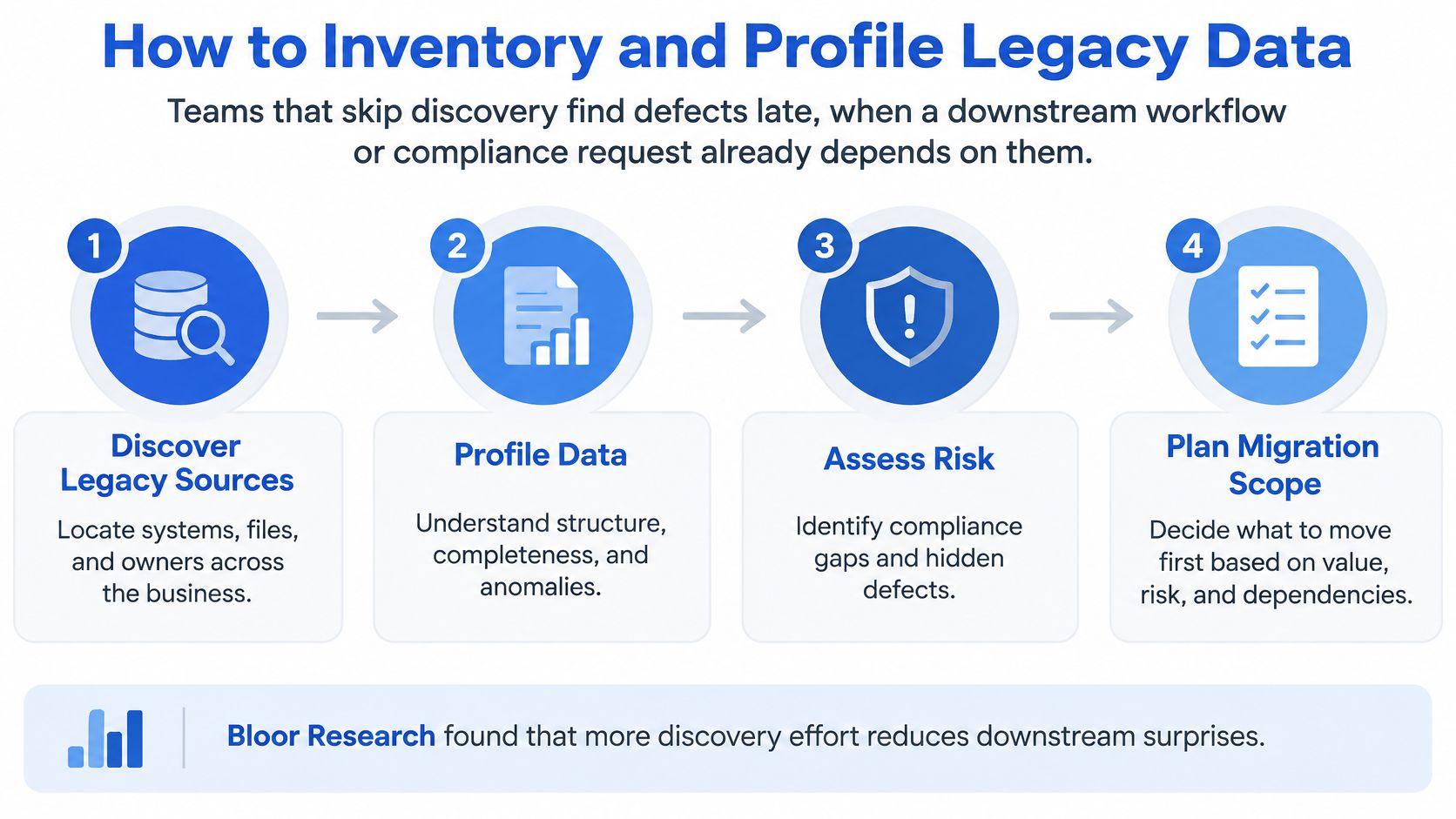
Migration planning starts with knowing which systems hold the data and how other parts of the business use it. A useful inventory covers more than databases: include files, reports, integrations, sign-in services, and batch jobs. Assign an owner to each source who can explain its role and resolve questions about the records.
Four Steps That Produce a Baseline
- List every source: Name each system, database, file share, spreadsheet, and report. Assign an owner who can answer questions and approve decisions.
- Map dependencies: Record batch jobs, reports, APIs, identity links, and downstream integrations, as well as database relationships.
- Profile each table: Measure row counts, null rates, distinct values in code fields, invalid foreign keys, duplicate business identifiers, and format changes over time.
- Save the baseline: Keep the profiling report as a reference for testing the target system. Do not rely on visual inspection alone.
The inventory establishes ownership. Dependency mapping shows where fields are used. Profiling makes data quality measurable, while the saved baseline gives later reconciliation a fixed reference.
Why the Dependency List Matters
A back office, customer portal, onboarding product, and custom sign-in service may all rely on the same customer record. A status flag used by sign-in might not appear on a database diagram, yet it can determine whether a customer can log in. If the inventory misses that dependency, the records may appear complete while access fails.
The inherited Australian healthcare platform Grail Computer Labs took over had three codebases and 32 .NET projects: a Vue 2 web portal, a separate .NET and Razor onboarding product, and a custom Node sign-in service. Grail audits inherited platforms by mapping the whole platform, reconstructing how it worked, identifying where changes could fail, and assessing what it would take to run.
Require the data owner's sign-off on the profiling report before field mapping begins.
That decision makes the baseline useful as evidence, not just a collection of counts. If later checks show that important records or relationships do not reconcile within the contract's agreed tolerances, the team has a clear basis to stop and address the failure.
How to Map Fields and Cleanse Records
Take a legacy customer status code with seven values and a target model with four states. Three values need a business judgement, usually dormant customers versus closed accounts. Any value with no agreed target state goes to a review queue the business owner runs. An engineer does not guess it to keep the load moving.
Start from the system of record and decide what each target field means before copying a row. Grail Computer Labs recommends starting from the system of record, defining the exact fields and actions the agent is allowed to use, and making ownership explicit to avoid brittle integrations. The same discipline applies to mapping. If nobody can state a field's meaning, later checks cannot prove the migrated value still means the same thing in the business.
Use a mapping sheet with five columns: source field, target field, transformation rule, owner, and sign-off date. Write the tolerance into the transformation rule, the gap a converted value may have and still count as a match. Tie rollback to failed reconciliation against that tolerance, not to elapsed time. A plain sheet every owner has signed is easier to defend than a clever script with no name on it.
Work the Ambiguous Values First
Model the core journey before you freeze the field map. On one inherited platform that journey was a state model with 27 states and 39 transitions, and it exposed missing paths for cancellations, disputes, failed fulfilment, notifications, and admin recovery. A field-level sheet alone would have missed those paths. The gap was not a column. It was a route through the process that no target state could represent.
Detect, Quarantine, Then Fix in the Rule
- Duplicate customers: Match on email, phone, and address together, quarantine conflicting groups, and let the data steward choose the surviving record.
- Invalid status codes: Compare distinct values against the approved code set, quarantine unknown values, and add an explicit rule for each one.
- Missing historical timestamps: Flag records where event order can't be reconstructed and agree whether they're excluded, estimated with a marker, or repaired from audit logs.
- Broken parent-child links: Query orphaned records, hold them out of the load, and fix the join logic rather than reattaching them by hand.
- Mixed date formats and free-text structure: Parse with a logged rule, quarantine unparseable values, and record the original text alongside the converted value.
Write every correction into the transformation rule so the next rehearsal produces the same result. A manual edit in the target is not a repair. It will not rerun, and the defect returns at cutover.
Close the stage with the top ten defects in the source data, each with an owner and a fix rule. If that list does not exist, the profile was not deep enough to sign the map.
Pilots, Rehearsals and Choosing a Cutover Pattern
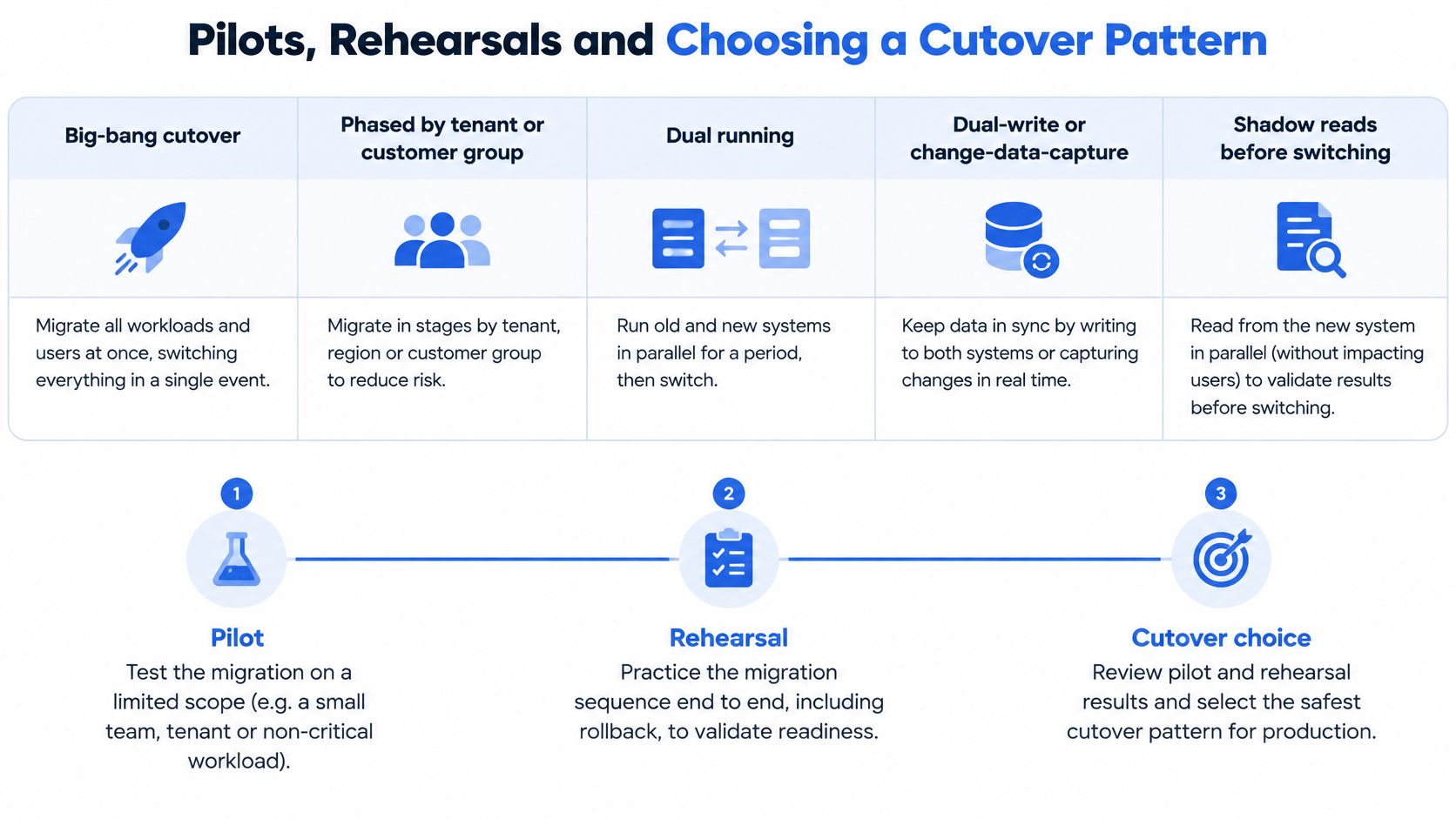
Choose the cutover pattern according to the risk the business can tolerate. The pattern determines how long the legacy system remains authoritative, how much comparison is possible, and how clearly the team can reverse the change.
| Pattern | Best fit | Main risk | Rollback path |
|---|---|---|---|
| Big-bang cutover | Small datasets where a short outage is acceptable | Long outage and a failure that is hard to reverse | Restore from an immutable source snapshot |
| Phased by tenant or customer group | Multi-tenant platforms and managed-service businesses (MSPs) with many client groups | Mismatches concentrated in one group go unnoticed | Feature flag moves that group back to legacy |
| Dual running | Regulated workflows that need side-by-side comparison | Two systems to keep consistent and staffed | Route reads and writes back to the legacy system |
| Dual-write or change-data-capture | Systems that cannot stop writes during the transition | Replication lag and failed events | Stop replication and keep the legacy system as authority |
| Shadow reads before switching reads | Read-heavy services where output must match exactly | Shadow results differ on edge cases | Keep serving reads from the legacy system |
For a deeper treatment of how these patterns fit target design, see Rite NRG's migration architecture guide.
Keep Legacy Authoritative Until Validation Passes
A staged zero-downtime migration pattern expands the target schema first, keeps old and new representations compatible, backfills historical records, compares shadow reads, switches reads gradually, and only then removes the old structure. During transition, the old write path can remain authoritative while dual-write or change-data-capture sends changes to the target. Monitor replication lag, failed events, mismatched records, error rates, and latency throughout.
For pilots, Grail Computer Labs recommends connecting one source at a time, comparing every new CRM record with its original submission, and fixing failures before adding the next source. That's a recommended practice, not a measured result. Treat the move from pilot to production as an operating change: stabilise one workflow, then expand into adjacent workflows that reuse the same systems and approval logic.
Check mismatch rates by tenant, partition, and customer segment. An aggregate rate can hide a concentrated failure that disrupts one group.
The Handoff Checklist
- Delayed jobs: Confirm they've crossed the migration boundary.
- Old-version traffic: Confirm it has stopped.
- Mismatch rates: Confirm they sit inside the agreed threshold.
- Rollback: Confirm instructions have been exercised, not just written.
Set the acceptable service impact before cutover, including any planned interruption. In-flight transactions, sequence state, connection caches, schema changes, and writes arriving after promotion can all affect the handoff. Tie rollback to failed reconciliation against the signed data contract, rather than to elapsed time alone.
How to Validate Migrated Data Beyond Row Counts
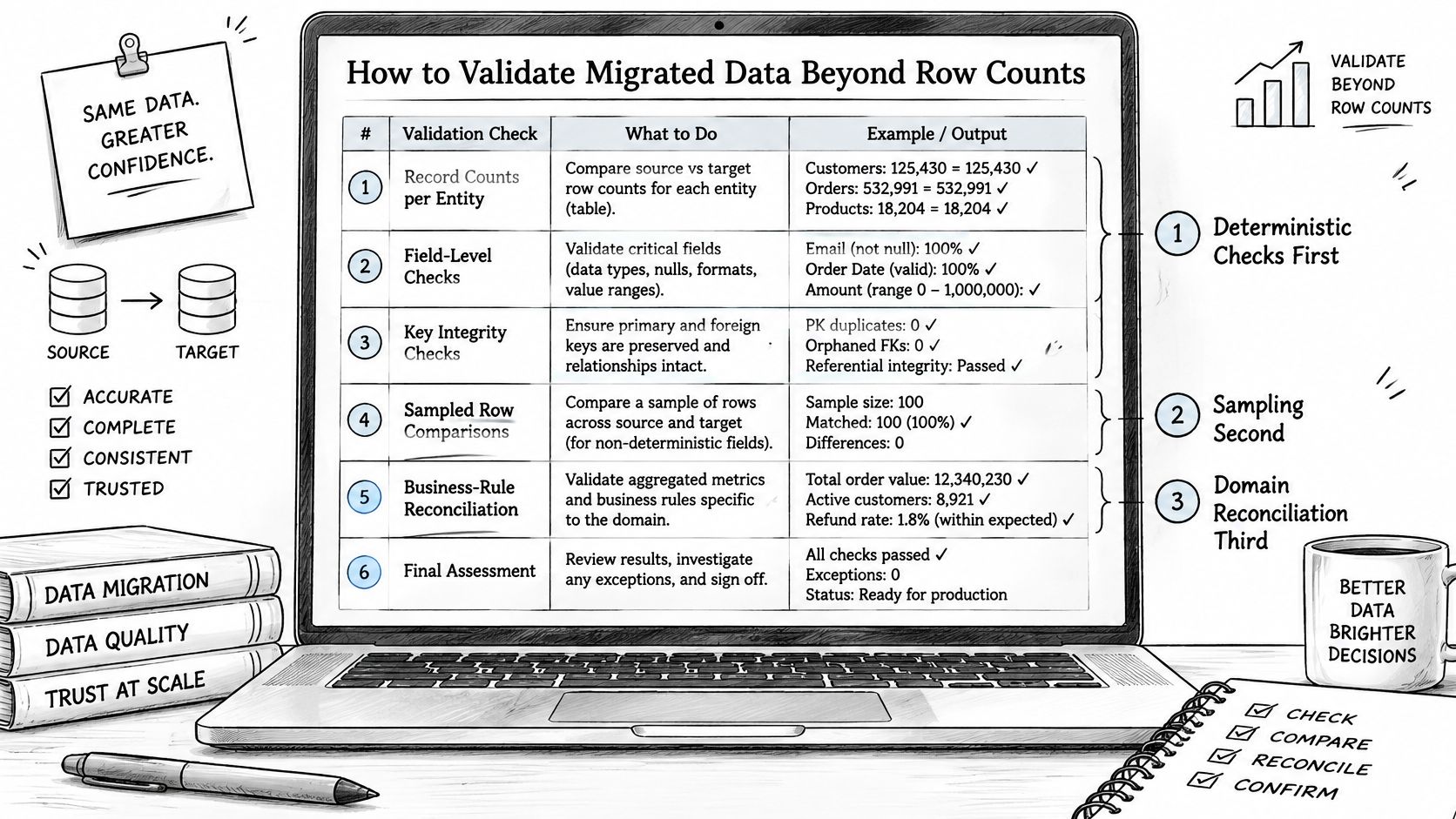
Row counts prove volume. They don't prove meaning. Validation should run in order, deterministic checks first, sampling second, domain reconciliation third.
| Check | How to run it | Pass condition |
|---|---|---|
| Record counts | Compare source and target counts per entity and run | No unexplained gap, and every rejected row is logged |
| Control totals | Sum amounts, quantities and hash totals on both sides | Difference sits within the tolerance set in the data contract |
| Key uniqueness and referential integrity | Query duplicate business keys and orphaned links | No duplicate business identifiers and no orphaned records |
| Null-rate change | Compare null rates per field before and after the load | Any rise is investigated before sign-off |
| Random sample | Set sample size from the confidence level and error limit | Record selection and field content both checked and passed |
| Domain reconciliation | Compare balances, entitlements, statuses and downstream reports | Outcomes match for every agreed business scenario |
Sampling With Tolerances Set in Advance
In a peer-reviewed electronic-health-record conversion, validators calculated random sample sizes for each data type using a desired confidence level and error limit, checked both record selection and field content, and re-sampled after correcting any detected cause. No migrated-data errors were found during the following 12 months, although an unrelated clinical-notes omission occurred after go-live. That caveat matters. Good sampling reduces risk, it doesn't certify perfection.
Set confidence and error tolerances before migration, stratify samples by risk and data type, quarantine failures, correct the transformation, and rerun validation. Don't accept an aggregate pass rate that hides a failing category. Concerns of this kind also sit behind the data migration challenges facing SAP leaders, where confidence in migrated data shapes programme decisions.
High-risk fields need tighter treatment. Clinical notes, financial balances, consent status, identity attributes, and regulatory records should carry tighter tolerances and independent business-owner sign-off.
Three Levels of Correctness
A migration can be technically complete and still fail if reports, approvals, or customer journeys produce different outcomes.
Separate record-level accuracy, process-level equivalence, and outcome-level accuracy. Record accuracy asks whether fields arrived correctly. Process equivalence asks whether workflows, permissions, and event sequencing behave the same. Outcome accuracy asks whether balances, decisions, and reports match.
Tie rollback to failed reconciliation at any of those levels. Keep immutable extracts, audit logs, replayable transformations, and a tested rollback path, because users can't trust a result they can't explain.
Protecting Personal Data During the Transfer
Every copy made for migration is still personal data. That includes staging files, queues, backups, test extracts, and the new platform. Teams often protect the target carefully and leave a staging extract readable by half the project.
European guidance on the General Data Protection Regulation (GDPR) says personal data should not be kept in identifiable form longer than necessary, and organisations should know where data enters, its format, where it is stored, where it is transferred, and with whom it is shared. Those principles turn into concrete tasks.
Six Controls to Put in the Plan
- Classify every field: Tag personal, sensitive, and financial fields before extraction.
- Exclude out-of-retention records: Apply the retention schedule before data leaves the source.
- Document every location: Record each staging location and replication path.
- Restrict and delete: Limit access to extracts and set a date when temporary copies are deleted.
- Check cross-border transfers: Confirm appropriate safeguards when data leaves the European Economic Area.
- Build the evidence pack: Link each mapping and transformation to an owner, and keep timestamps, ownership metadata, source and target watermarks, and an exception log.
These controls also serve data-subject requests. If a deletion or access process can't find copies in staging files, queues, or backups, the migration has created compliance exposure even when the load succeeded. The common failures are mundane. Obsolete extracts remain accessible after cutover, or the new system loses the retention, consent, or deletion context attached to the original record.
A practical test closes the loop. Pick one customer record and confirm the team can locate every copy across source, staging, target, and backups, then delete or export it on request. This is general guidance, not legal advice, and the data protection officer should review the plan before extraction starts.
Limits of This Plan and Where to Start
No single migration timeline, budget, or cutover pattern fits every legacy system. The right plan depends on data quality, who can approve changes, and how much of the existing behaviour is undocumented. Any estimate made before profiling carries substantial uncertainty.
For regulated migrations, have the data protection officer and legal counsel review the plan against applicable retention, consent, and reporting requirements.
Start with one critical entity. Profile its records, identify who owns the decisions, and agree on a signed data contract before building migration logic. Define the fields and business meaning, acceptable tolerances, owners for exceptions, and the reconciliation failure that triggers rollback. This test exposes gaps in ownership and undocumented rules before the programme expands.
Readers can test the plan against their systems by booking a call at grail.computer. Grail Computer Labs offers a 15-day trial for qualified clients, who can stop within that period without paying. An outcome engagement then targets one predefined, measurable result, such as a rebuilt platform or automated workflow, delivered in 4 to 8 weeks.
To discuss a stalled migration or inherited platform, visit Grail Computer Labs and book a call.