
What an Application Modernization Service Covers
An application modernization service should protect live operations. See what it covers, when to use it, and how to measure the result.
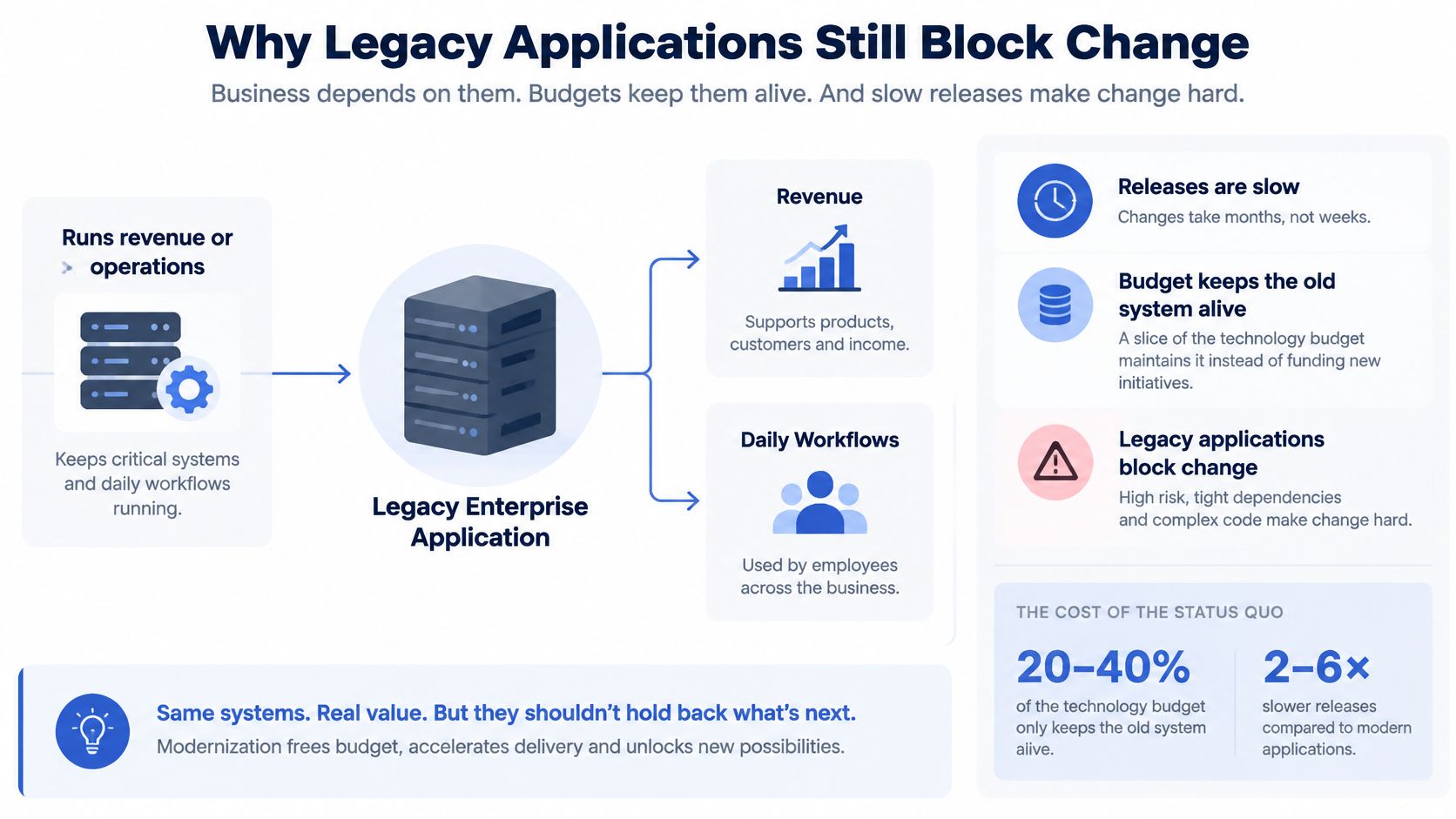
The application still runs revenue or operations. It also blocks the next release. That tension defines an application modernization service in practice. The job isn't to chase newer technology. It's to make a live, business-critical system changeable again without stopping customers, staff or partners who depend on it each day.
Why Legacy Applications Still Block Change
US technical debt reached an estimated US$1.5 trillion in 2022, according to Deloitte's analysis of core IT modernisation. Chief information officers were allocating approximately 10% to 20% of their technology budgets to resolving issues associated with outdated systems, Deloitte reported in the same analysis. That spend leaves less room for new products, automation and data work.
The estimate applies to the United States, not a global census. The operational constraint is familiar across healthcare, financial services, government and multi-party platforms: the application cannot be switched off when it holds orders, records, payments or regulatory evidence.
What Modernisation Covers
Modernisation starts with an operating baseline. Map the code, data stores, integrations, credentials, owners and undocumented decisions. Record how releases work and whether the team can recover the service. The first deliverable should be a baseline the team can restore and a measured view of release reliability, not a rewrite or a cloud landing zone.
From there, change the estate in stages through rehosting, replatforming, refactoring, rebuilding or replacing selected parts. Keep customers on the live system while each change is tested against existing data and business processes. This can take longer than a clean restart, but it limits disruption and preserves knowledge the replacement must retain.
A legacy application becomes a problem when nobody can change it safely.
When Modernisation Is the Wrong Answer
Modernisation is a poor fit when leadership has not settled what the product should do. New infrastructure cannot resolve an undecided offer, pricing model or operating process. A rebuild may carry the same confusion onto a cleaner stack.
The work fits when the business rule is settled but the software blocks delivery. An intake workflow, for example, may be understood by staff but difficult to extend. A reporting process may fail whenever an integration changes. Stabilisation delays visible features; skipping it leaves each feature exposed to hidden operational risk.
Ask whether a named owner can explain how a release reaches production, how it rolls back and which data it touches. If those answers exist only in memory, recover control and transfer that knowledge before choosing the scope of change.
The Six Moves a Modernisation Service Makes
A credible provider names the move for each workload. One slogan for a whole estate hides the true risk. A payments module, a customer portal and an internal report rarely need the same treatment. The default for a system that cannot stop is usually strangler integration, because it moves one workflow at a time beside the live application. Other moves earn their place when a specific constraint makes that default too slow, too narrow or unnecessary.
Six modernisation moves and the continuity risk
| Move | What changes | When it fits | Continuity risk |
|---|---|---|---|
| Rehost | Infrastructure only; behaviour stays | Stable application on an end-of-life host | Low if config, credentials and data paths stay mapped |
| Replatform | Same application, new runtime or managed services | Need scale or support without a rewrite | Medium around data stores and integrations |
| Refactor | Internal structure; business behaviour kept | Coupling makes every fix slow or unsafe | Medium, and only after tests cover the rules |
| Rebuild | New stack around the same business rules | Inherited code cannot be made dependable | High unless cutover is staged and rules are tested |
| Replace | A product takes over a commodity function | The workflow is not a differentiator | High on data migration and process fit |
| Strangler integration | New services beside the live application | The system cannot stop for a cutover | Lower if one workflow moves at a time |
Moving Off the Default
Rehosting makes sense when the host is the deadline. Say, hypothetically, a stable scheduling application runs on unsupported servers, releases reliably and changes rarely. Moving it unchanged buys time. It doesn't fix tangled code, slow releases or missing tests, so it shouldn't be sold as transformation.
Replatforming fits when the application behaves well enough but the runtime blocks support or scale. The work concentrates on managed databases, queues, identity and deployment. Continuity risk rises around secrets, network rules and data replication. A team should prove backup restore and rollback before traffic moves, not after customers report errors.
Refactoring suits code that staff must keep but fear touching. The trade-off is discipline. Without tests that lock in current behaviour, restructuring can change a price, eligibility rule or status transition by accident. With tests in place, smaller modules reduce the blast radius of each later change.
When Higher Risk Is Justified
A rebuild is justified when inherited code cannot be made dependable. Warning signs include missing source history, duplicated rules, no reliable local build and fixes that break unrelated workflows. Even then, a rebuild should recover and test the business rules first. Rewriting screens is easy compared with rediscovering why an exception exists.
Replacement fits commodity work. If a workflow doesn't differentiate the business, a product may carry it with less custom code. The risk shifts to process fit, data migration and staff retraining. Leaders should test the awkward cases, not just the standard path shown in a demo.
Decision rule: Choose the least disruptive move that removes the named blocker for that workflow, then prove rollback before expanding scope.
Mixed estates often need several rows at once. A portal may be rebuilt, a database replatformed, and a document function replaced. The mistake is forcing one answer across all three because it simplifies the proposal.
When the Spend Already Justifies the Work
CIO Dive reported on a 2024 SnapLogic survey of 750 IT decision-makers. CIO Dive's coverage of the SnapLogic survey gives the findings in full. The average business spent approximately US$2.9 million in 2023 on legacy-technology upgrades, and nearly two-thirds of surveyed businesses invested more than US$2 million in maintaining and upgrading legacy systems.
The labour signal is just as relevant. More than three-quarters of IT decision-makers spent between 5 and 25 hours each week updating or patching legacy systems. More than three in five IT leaders said technical debt had a moderate or severe negative effect on their data stack.
Legacy cost signals in the 2024 SnapLogic survey
| Signal | Reported figure |
|---|---|
| Average spend on legacy-technology upgrades in 2023 | About US$2.9 million |
| Businesses investing more than US$2 million in maintaining and upgrading legacy systems | Nearly two-thirds |
| IT leaders saying technical debt has a moderate or severe effect on their data stack | More than three in five |
| IT decision-makers spending 5 to 25 hours each week updating or patching legacy systems | More than three-quarters |
These survey findings describe major-market businesses, not a forecast of your bill. Use them as context, not as a promise of savings. Your case should rest on your own maintenance records, incidents and delayed work.
The Cost Mechanism
Legacy cost recurs in patching, incident response, integration fixes and delayed releases. Senior engineers spend time explaining old behaviour instead of building the next customer workflow. A small change can also require broad manual regression, pushing product dates back.
Opportunity cost is harder to invoice, but teams can see where it accumulates. Time spent keeping fragile software running is time unavailable for improving onboarding, pricing or reporting. Customers may feel the effect through missing features or slower support.
A Three-Signal Test
Scope a service when these three signals appear together:
- Patching dominates senior time: Engineers who understand the system spend much of their week on fixes, restarts and workarounds.
- Small changes break distant workflows: A form edit affects billing, or a report change slows order processing, because dependencies are unclear.
- Nobody can name a safe launch date: Release planning depends on one person, a quiet weekend and a manual checklist.
One signal may justify a narrower fix. If the application changes rarely, has a known owner and the problem sits in one integration, address that integration first. Modernising the whole estate would add risk without removing the blocker.
The business case depends on measurement. Gather ticket categories, incident time, release delays and maintenance hours from internal systems. Without those records, decisions rest on anecdotes rather than a clear view of the work and its cost.
Delivery Measures That Show Risk Has Fallen
A finished migration isn't proof of a better system. Leaders should record delivery baselines before architecture changes, then compare each stage against those numbers. Google's 2024 DORA report defines change lead time, deployment frequency, change failure rate and failed-deployment recovery time, and added deployment rework rate in 2024.
Delivery measures to baseline before a re-platform
| Measure | What it captures | Record before the change |
|---|---|---|
| Change lead time | Time from code commit to successful production deployment | Pipeline timestamps |
| Deployment frequency | How often changes reach production successfully | Deployment records |
| Change failure rate | Share of deployments needing a hotfix or rollback | Deploy records linked to incidents |
| Failed-deployment recovery time | Time to restore service after a failed release | Median and a high percentile, not only the average |
| Deployment rework rate | Share of deployments that create unplanned corrective work | Unplanned follow-up deploys, from the 2024 DORA set |
Pair Speed With Stability
The acceptance rule is strict. Faster releases that raise rollbacks or incidents have moved risk, not removed it. A rewrite that shortens code paths but lengthens recovery time has increased operational risk, even if the new stack looks cleaner.
Recovery time needs care. Averages hide the few incidents that damage trust. Reporting the median and a high percentile shows both the usual case and the bad day. Smaller deploys, automated regression tests, contract tests, feature flags and canary releases give teams practical levers when those numbers move the wrong way.
Migration completion is a milestone. It isn't a result.
Build the Evidence Trail
Each measure should come from timestamps and records. Pipeline logs supply commit and deployment times. Incident records supply failure and recovery times. Release notes should link to the change, tests and approvals that allowed it to ship.
That trail matters where a change could affect money, access, safety or compliance. A named reviewer should approve the release, and the record should show which tests ran. This isn't bureaucracy for its own sake. It lets a team explain a failure and reverse it without guessing.
Monitoring needs the same discipline. Teams setting up checks for release health can use monitoring fundamentals from SiteAlive to clarify what to watch, then connect alerts to deployment records. Reader detail on the wider software development life cycle (SDLC) sits in an overview of the agentic software development lifecycle.
The limit stays important. DORA measures describe software delivery, not customer adoption, revenue or regulatory compliance. Pair them with one business outcome, such as completed onboardings, approved applications or resolved cases. Otherwise, a team can ship faster while the customer experience (CX) stays flat.
How to Modernise Without Stopping Operations
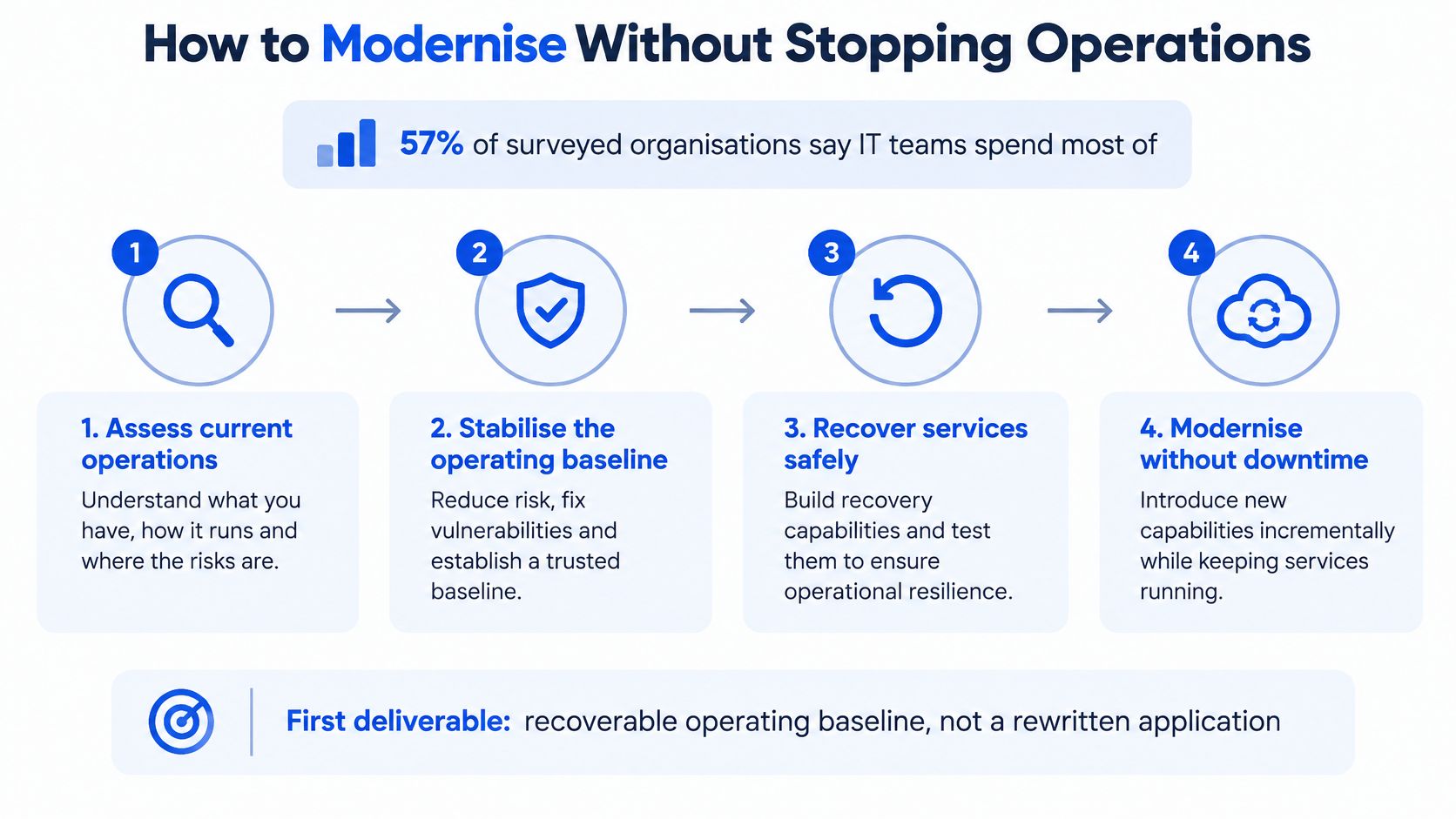
A modernisation can preserve day-to-day operations only if a different team can understand and run the system. Start with a recoverable operating baseline: an inventory, tested business rules, deployment controls, observability and a staged cutover plan. This gives the team a clear view of what must keep working and how to restore service if a change fails.
Ensono's 2025 State of IT Modernization report found that 57% of surveyed organisations say their IT teams spend most of their time maintaining day-to-day operations. The report also found that 49% report that actual legacy-maintenance costs exceeded plan in the previous year. 90% report at least one talent gap, with cloud architecture and migration expertise the most common at 27%, according to the same report.
Six Steps That Protect Continuity
Inventory the system. Record dependencies, data classes, credentials, integrations, scheduled jobs and decisions held only in people's heads. This exposes what a team needs to protect before it changes the system.
Recover rules as tests. Turn pricing, eligibility, approval and status rules into automated checks before changing the architecture. Tests give the old and new paths the same exam, reducing the risk of silent behaviour changes.
Choose one workflow. Start with a bounded journey, such as onboarding, document upload or renewal approval. Run the new path alongside the old one where the architecture allows it. A narrow scope makes it easier to spot problems before expanding the change.
Release with a tested exit. Use a feature flag or canary release, and keep the old path available until the new path matches the baseline measures. Practise rollback with real credentials and data controls. A rollback that exists only on paper won't restore service.
Move operating controls with the workload. Bring identity, logs, backups, alerts and audit evidence along with the function. Decommission the parallel path after cutover, and remove temporary replication tools and shared credentials that are no longer needed.
Leave ownership in plain sight. Give client teams the code, tests, decision records and runbooks. This makes it possible for an internal team or another provider to take over without repeating discovery.
How the Work Stays Connected
Grail Computer Labs keeps requirements, code, tests, approvals, monitoring and ongoing tickets connected throughout software modernisation work. Its Software Factory runs requests through triage, specification, implementation, review, verification and release. Agents execute tasks, GC Labs engineers make decisions, and customers see progress on a dashboard. Every change is reviewed by an engineer and must pass its tests before release.
For work where data replication and controlled cutover shape the plan, legacy system migration services can support a staged transition. For managed-service businesses (MSPs), which run multi-party platforms for clients, workers or partners, a failed release can disrupt several groups at once. Keeping the operating baseline and handover knowledge intact helps contain that risk.
Modernise one workflow, prove recovery, then widen the programme.
What a Staged Rescue Looks Like in Practice
An Australian healthcare platform had been stuck in development for eight months, with no clear deadline. Grail Computer Labs took over from the previous vendor, rebuilt the platform and brought it into production within 30 days. By day 40, 100 business customers had been onboarded. These figures describe one engagement, not a typical takeover timeline.
The inherited platform had three codebases and 32.NET projects: a Vue 2 web portal, a separate.NET and Razor onboarding product, and a custom Node sign-in service. Grail audited all three codebases, retained the business rules that mattered, and rebuilt the platform on TypeScript, React, Hono, Postgres, Temporal, Sentry and AWS.
Evidence of Control
The rebuilt platform has more than 700 automated test files covering business rules, APIs, database changes, long-running work, browsers and complete user journeys. That coverage gives the team a way to change onboarding or scheduling while checking that recovered rules still hold.
For a Singapore-based neobank, a one-week build raised automated approvals from 44% to 90% in testing. Production performance would need to be assessed against live traffic, exception handling, audit review, and monitoring for false approvals and false rejections.
The AI Limit
Ensono's 2025 state of IT modernisation report announcement found that 39% of IT teams in one modernisation survey said AI tools had accelerated their efforts, while 33% said the tools introduced new challenges. Faster code generation alone does not show whether a modernisation effort has improved delivery.
Keep generated changes away from undocumented clinical, financial or regulatory rules until those rules have been tested. A named person must remain accountable for approval. The record should show what changed, why it changed, which tests ran and who reviewed it.
Hypothetically, an AI-assisted refactor that halves coding time but doubles rollbacks has worsened operations. Track defect escape rate, rollback frequency, security findings, approval time and test coverage for recovered rules. If those measures do not improve, the work has shifted from writing code to repairing releases.
Decide the First Outcome Before You Hire
Name one verifiable outcome before requesting a proposal. It might be a platform that can take customers, one workflow released beside the old system with a rollback, or a measured rise in a baselined delivery metric. A proposal that starts with a full rewrite, a headcount plan or a cloud move with no inventory is answering a different question.
A buyer can build a useful feature comparison matrix to compare proposals against that outcome rather than against feature promises. The same discipline applies when reviewing options for ongoing application management services after the first release. Grail Computer Labs offers a takeover process and an improve-or-rebuild service for existing systems, which is software rescue when a previous supplier has stalled.
Five Questions Before Signing
- Outcome: Which measurable outcome does the first engagement deliver?
- Ownership: Who owns the code, cloud, models and documentation at the end?
- Continuity: Does the team that starts the work keep delivering afterwards?
- Release control: How is each change reviewed and tested before release?
- Baseline: Which measures are recorded before work starts?
An outcome engagement sets one measurable outcome and delivers it in 4 to 8 weeks, after a call under a non-disclosure agreement. Qualified clients can stop within the first 15 days without paying under the 15-day trial. Afterwards, continuous delivery means the same team keeps shipping across the codebase, including changes, monitoring and site reliability, without a fresh scoping exercise. A provider that can't answer the five questions in writing hasn't settled the decision the buyer needs settled.
For a fragile platform that still carries customers, Grail Computer Labs offers software rescue and staged re-platforming through an outcome engagement, with a 15-day trial for qualified clients. Book a call at grail.computer to name the first measurable outcome, record the baseline, and agree how rollback, ownership and release evidence will work before code changes begin.